OData Publishing
OData is an open specification with standardized ways of accessing, updating, inserting and deleting data and exposing metadata. It has clients on multiple platforms including .NET, JavaScript, PHP, Java, and Ruby. OData provides clients with the metadata required to find tables and all the information about the fields and the relationships between them. It is built on top of other standards, among them HTTP, JSON, AtomPub and XML. OData services are restful.
Data Abstract & OData
Data Abstract for .NET lets you expose your regular Data Abstract services, along with all associated business logic, as OData services, giving you and your customers a cross platform way of accessing the data. To expose a Data Abstract service through OData, you need an HTTP based server channel such as the IpHttpServerChannel. To enable OData, place a ODataSchemaDispatcher next to your HTTP server channel component (or, in case of the WebProcessor, associate it through code).
The OData schema dispatcher has a few properties that need to be set. One is the Namespace, which is a unique XML namespace URL (can be any URL, as long as it's unique) for your data. RootUrl will have to contain the full URL this service is accessible through and ServiceName should contain the name of the service class (as defined in the RODL/_Impl file) for the Data Abstract simple service.
The How to enable OData Publishing article describes how OData support can be added to an already existing Data Abstract for .NET custom server or to the Relativity server.
Accessing Data via OData
Because a Data Abstract OData service is a standard OData feed, you can consume it from any OData-capable client. The example below uses LINQPad, a free tool for querying data with LINQ.
The steps assume the Relativity server is running with OData support enabled (see How to enable OData Publishing), exposing the Simple schema of the DASamples domain at http://localhost:7099/odata/DASamples/Simple.
- Install LINQPad 5 (the .NET Framework edition). It includes the built-in WCF Data Services 5.x (OData 3) driver, which matches the OData version served by Data Abstract.
- In LINQPad, click Add connection, select the WCF Data Services 5.x (OData 3) driver and click Next.
- Enter the OData URL
http://localhost:7099/odata/DASamples/Simple. Under Log on details, enter the user nameDataand the passwordRelativity(the login for the bundled DASamples domain), then click OK. - LINQPad connects and lists the published tables (Clients, Orders, Products, and so on) in the connection tree on the left.
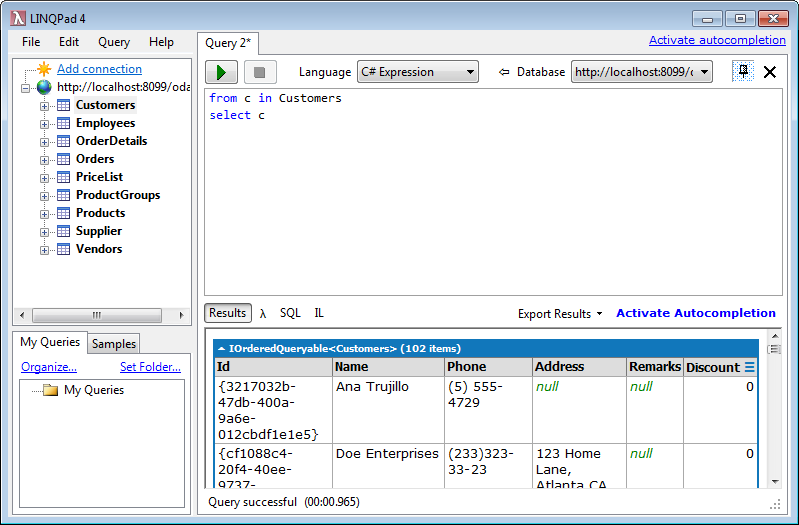
- Select the connection, set the query language to C# Expression and run a query such as:
from c in Clients
select c
The results are returned directly from the Data Abstract service over OData:
You can also consume the same feed from Microsoft Excel using its built-in Get & Transform (Power Query) support:
- On the Data tab, click Get Data > From Other Sources > From OData Feed.
- Enter the feed URL
http://localhost:7099/odata/DASamples/Simpleand click OK. - When prompted for credentials, select Basic, enter the user name
Dataand the passwordRelativity, then click Connect. - In the Navigator, select a table such as Clients and click Load.
Excel loads the data onto the worksheet, with the OData feed listed under Queries & Connections:
